
S3 · S3 ViRGE / Trio3D
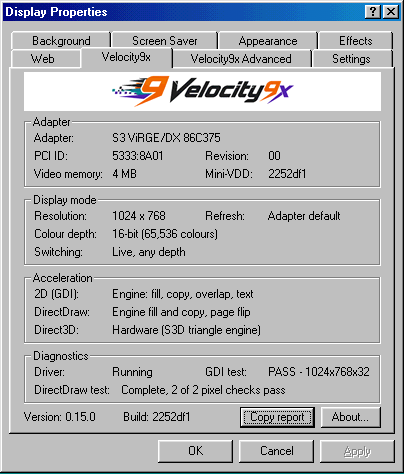
S3 ViRGE/DX
Velocity9x: Verified working
The S3D engine draws only what it can express exactly, in 5:5:5 colour. It has no additive or multiplicative blend, so some 3DMark tests draw plainer and games that rely on those blends are missing parts of their picture.
- Manufacturer
- S3
- Chip
- 86C375
- Family
- S3 ViRGE / Trio3D
- 3D engine
- S3D
- Bus
- PCI
- PCI ID
- 5333:8A01
Package
s3
Tested on
One physical card, plus the 86Box emulator.
Acceleration by interface
2D / DirectDraw
Tested
GDI
Direct3D
Tested
0.36.0
Direct3D 8
Not run
OpenGL
Probe
Two texture units
No
Glide
No
probe fails
ATI 3DCIF
Not run
What has been tested
GDI on the engine; Direct3D and OpenGL tested on an emulator and, from 0.36.0, on one physical card (3DMark 2000 at 800x600x16).
Sources and testing notes
Screenshots
Tested games and benchmarks
| Title | API | Result | Version |
|---|---|---|---|
| 3DMark 2000 | Direct3D | At 800x600x16 on one physical card | 0.36.0 |
Install on Windows 98
- Take a cold backup and confirm you can reach Safe Mode.
- Download the
s3package(S3 Trio, ViRGE and Trio3D). - Device Manager → Display adapters → Update Driver → Have Disk, over the top of the current driver.
- Shut down fully, then cold-start once.