
Get involved
Lend a machine with remote help
Install the V9x Remote Agent, switch on remote help, and let the developer work on your Windows 9x or 2000 machine over the Internet, safely and only while you choose.
If you have a machine with a graphics card that Velocity Drivers does not support yet, or a problem that only shows up on your hardware, you can lend that machine to the developer for a while. They work on it directly, as if it were on their desk, and you stay in control the whole time.
What you need: the machine running Windows 95, 98, Me or 2000 with an Internet connection, and the V9x Remote Agent 0.12.0 or later.
Step by step
-
Install the agent. Download
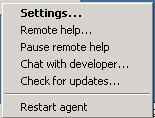
V9XREMOTE.ISOorv9x-remote-agent-<version>-win32.zipfrom the latest release, copy the files to the machine and runSETUP.EXE. An icon appears next to the clock. Already have an older agent? Right-click the icon and choose Check for updates…. -
Turn on remote help. Right-click the icon and choose Remote help…. Read what it allows, choose On, enter your name and, if you have one, your GitHub username, then click Save. The agent restarts and the page shows this machine’s id, such as
M-4F7K2Q. -
Ask for help. Open an issue with:
- the machine id from the Remote help page;
- the hardware involved (card make and model, or the PCI ID from Device Manager) and what goes wrong;
- roughly when the machine can be left on.
If you can, leave it on and online for at least 48 hours after opening the issue. The developer may be in a different time zone, and driver work often needs several sessions with rebuilds in between. You can keep using the machine meanwhile; just pause remote help when you need it to yourself.
-
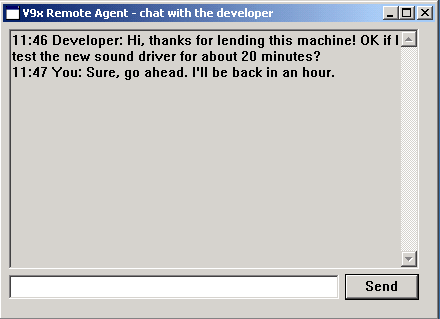
Talk it through. The developer says hello in the agent’s chat window before starting; it pops up on your screen by itself. You can reply at any time, or open it from the icon (Chat with developer…).
-
Stop whenever you like. Pause remote help on the icon’s menu blocks all commands at once (chat keeps working) until you choose Resume or the agent restarts. To end it for good, open Remote help… again and choose Off.

What lending allows, and what protects you
- While remote help is on and not paused, the developer can run programs, see the screen, use the keyboard and mouse, copy files and restart the machine. That is what driver work needs.
- Every command is signed with a key that exists only on the developer’s own PC, and the agent checks the signature before acting. Neither the update server nor anyone between you and it can make the machine do anything.
- The connection is plain HTTP (Windows 9x has no usable encryption), so someone on the network path could watch a session. Do not keep private files on a machine while you lend it.
- The tray icon’s tooltip reads “In use: last command … ago” for a minute after each command, so you can see when the machine was last used.
- Remote help is off by default and does nothing until you turn it on. Off means the agent never contacts the server for it.
The full design is in the agent’s remote help documentation.