
Skip to content
Velocity9x
V9x Remote Agent: AI and MCP remote control for Windows 95, 98, Me and 2000 - Velocity Drivers

Tool · Windows 95 / 98 / Me / 2000 · DOS · BSD 2-Clause

V9x Remote Agent

Remote control for retro Windows machines, built for AI-driven development and debugging. A small, runtime-free agent (about 500 KB) runs inside Windows 95, 98, Me or 2000, in an 86Box VM or on real hardware. A PowerShell CLI or an MCP server on a modern machine then builds, pushes, runs, screenshots and reboots it, one bounded command at a time.

It was written to speed up Velocity9x driver development, but nothing in it is specific to drivers: use it to develop, test or automate any software on a retro Windows machine.

Latest release 0.17.0, 12 Nov 2026.

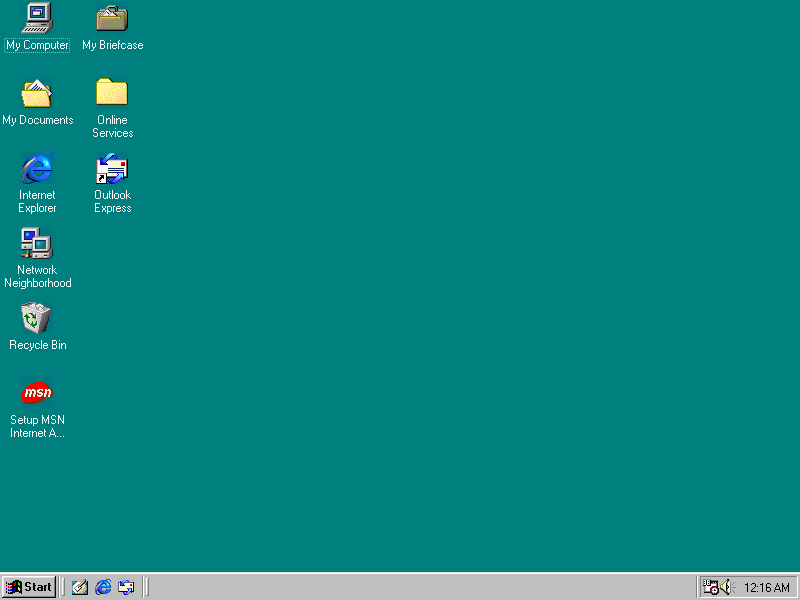
A Windows 98 desktop with the agent's icon in the notification area, captured by the agent itself
Taken by the agent itself: v9xctl.ps1 screenshot -Destination desktop.bmp

Why

A tighter loop for retro Windows development

Retro Windows development has a brutal inner loop: build on a modern host, copy into the VM by hand, click around, squint at the screen, reboot, repeat. The agent turns each of those into one command with JSON output and a documented exit code, which is exactly the interface an AI coding agent needs. Point Claude Code, or any MCP client, at a Windows 98 VM and it can compile, deploy, run, read the output, look at the screen and prove a clean reboot without anyone touching the emulator.

edit source on the host
      |
build  (Open Watcom or any Win32/Win16 toolchain)
      |
put / push-tree ......... CRC32-verified upload
      |
exec / shell ............ bounded run, streamed output, JSON
      |
get / screenshot ........ collect artifacts, look at the screen
      |
reboot + wait-desktop ... only when needed, with proof
      |
read the JSON, fix, repeat

What it does

Features

  • Run anything

    Win32 programs and COMMAND.COM commands with streamed stdout and stderr, byte limits, timeouts, cancellation and deterministic exit codes.

  • Move files safely

    CRC32-verified, transactional upload and download, recursive tree push, and guest-side HTTP download for payloads up to 2 GiB.

  • See and drive the screen

    24-bit screenshots, desktop-ready polling, and mouse and keyboard injection: clicks, drags, hotkeys, typed text and relative motion for games.

  • Reboot with proof

    A verified reboot needs a disconnect, reconnect, the persisted resume token, a changed start counter and a ready desktop. A hard reset covers machines that hang on restart.

  • Inventory in one call

    OS build, CPU, memory, drives, display adapter and mode, IP addresses, BIOS and loaded PnP devices.

  • Watch live

    An optional VNC server (V9XVNC.EXE, off by default) lets any VNC viewer watch and drive the machine; on Windows 2000 it follows the logon desktop too.

  • Find machines

    Optional LAN discovery over standard mDNS/DNS-SD, and a per-machine install ID that finds a guest again after its address changes.

  • Stay current

    Upgrades from the host with a hot swap and no reboot, or self-update from the tray with an Ed25519-signed, SHA-256-checked release.

AI remote control

MCP server for AI coding agents

mcp/v9x_mcp.py exposes the guest as Model Context Protocol tools over stdio. It is standard library only, needs Python 3.9 or later, and runs on Windows, macOS and Linux. It speaks the agent's protocol directly, so no PowerShell is involved.

Claude Code
claude mcp add v9x -- python /path/to/repo/mcp/v9x_mcp.py
Any MCP client (stdio)
{
  "mcpServers": {
    "v9x": {
      "command": "python",
      "args": ["/path/to/repo/mcp/v9x_mcp.py"]
    }
  }
}

Options: --host and --port (default 127.0.0.1:9869), --id to find a guest by its install ID over mDNS. A non-loopback host is refused unless you pass --allow-remote, because the guest protocol is unauthenticated. The repository's AGENTS.md is an operating manual written for AI agents.

42 MCP tools
Run and observe
v9x_execv9x_shellv9x_psv9x_killv9x_wait_processv9x_wait_faultv9x_windowsv9x_close_window
Files
v9x_put_filev9x_get_filev9x_push_treev9x_list_dirv9x_statv9x_read_textv9x_hashv9x_wait_filev9x_mkdirv9x_deletev9x_download
Screen and input
v9x_screenshotv9x_wait_desktopv9x_inputv9x_clickv9x_typev9x_keyv9x_movev9x_scrollv9x_displayv9x_vnc
Machine
v9x_pingv9x_infov9x_inventoryv9x_discoverv9x_reg_queryv9x_reg_writev9x_reboot_with_proofv9x_reset_with_proofv9x_shutdownv9x_update
Remote help
v9x_relay_machinesv9x_chatv9x_note

Full reference: mcp/README.md. Some tools need a recent agent; the reference lists the version for each.

Or from PowerShell: scripts\v9xctl.ps1 (Windows host)
.\scripts\v9xctl.ps1 ping
.\scripts\v9xctl.ps1 put -Source .\TEST.EXE -Destination C:\V9XREMOTE\JOBS\demo\TEST.EXE
.\scripts\v9xctl.ps1 exec -Application C:\V9XREMOTE\JOBS\demo\TEST.EXE -Arguments "/quiet"
.\scripts\v9xctl.ps1 screenshot -Destination .\desktop.bmp -Json
.\scripts\v9xctl.ps1 input -Sequence "move 80,486; click left; type notepad; key ENTER"
.\scripts\v9xctl.ps1 reboot -JobId demo-reboot -WaitSeconds 180 -Json

Exit code 0 is success; 20-23 are transport and protocol failures, 30-33 process failures. Every verb: docs/host-cli.md.

Compatibility

Supported guests

GuestAgentNotes
Windows 95, 98, 98 SE, MeV9XAGNT.EXEThe primary target. Starts before anyone logs on; every command, including the hard reset.
Windows 2000V9XAGNT.EXE (same binary)Since 0.9.0. Starts at logon, so pair it with autologon; install SETUP.EXE as an administrator.
DOSV9XAGNT.EXE (DOS/4GW build)Command execution and verified file transfer over the same protocol and tools.
Windows NT 4.0, Windows XP-Untested.

Host: the MCP server runs anywhere Python 3.9+ does; the PowerShell CLI needs Windows PowerShell 5.1. No Microsoft software is included: supply your own Windows media and licence.

Quick start

An 86Box VM in three steps

  1. Give the VM an NE2000 PnP network card on SLiRP and forward TCP port 9869, in the profile's 86box.cfg while 86Box is closed.
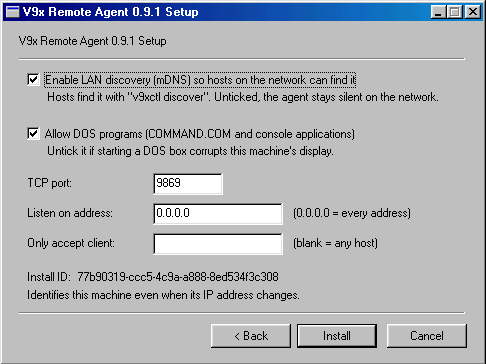
  2. Attach V9XREMOTE.ISO from the release as a CD and run D:\SETUP.EXE in the guest. It asks for the few settings that matter, shows the machine's install ID and restarts Windows.
  3. From the host: .\scripts\v9xctl.ps1 ping. {"Success":true,...} means an AI agent can now drive the guest.
The agent's SETUP.EXE settings page: LAN discovery, DOS programs, TCP port, listen address, allowed client and install ID
SETUP.EXE settings.
The agent's tray icon, green while active, with a tooltip showing the version, port and IP address
The tray icon flashes green while a host is working.

Starting from nothing? docs/quickstart-86box.md walks a full 86Box setup. For a physical machine, see docs/physical-machine.md.

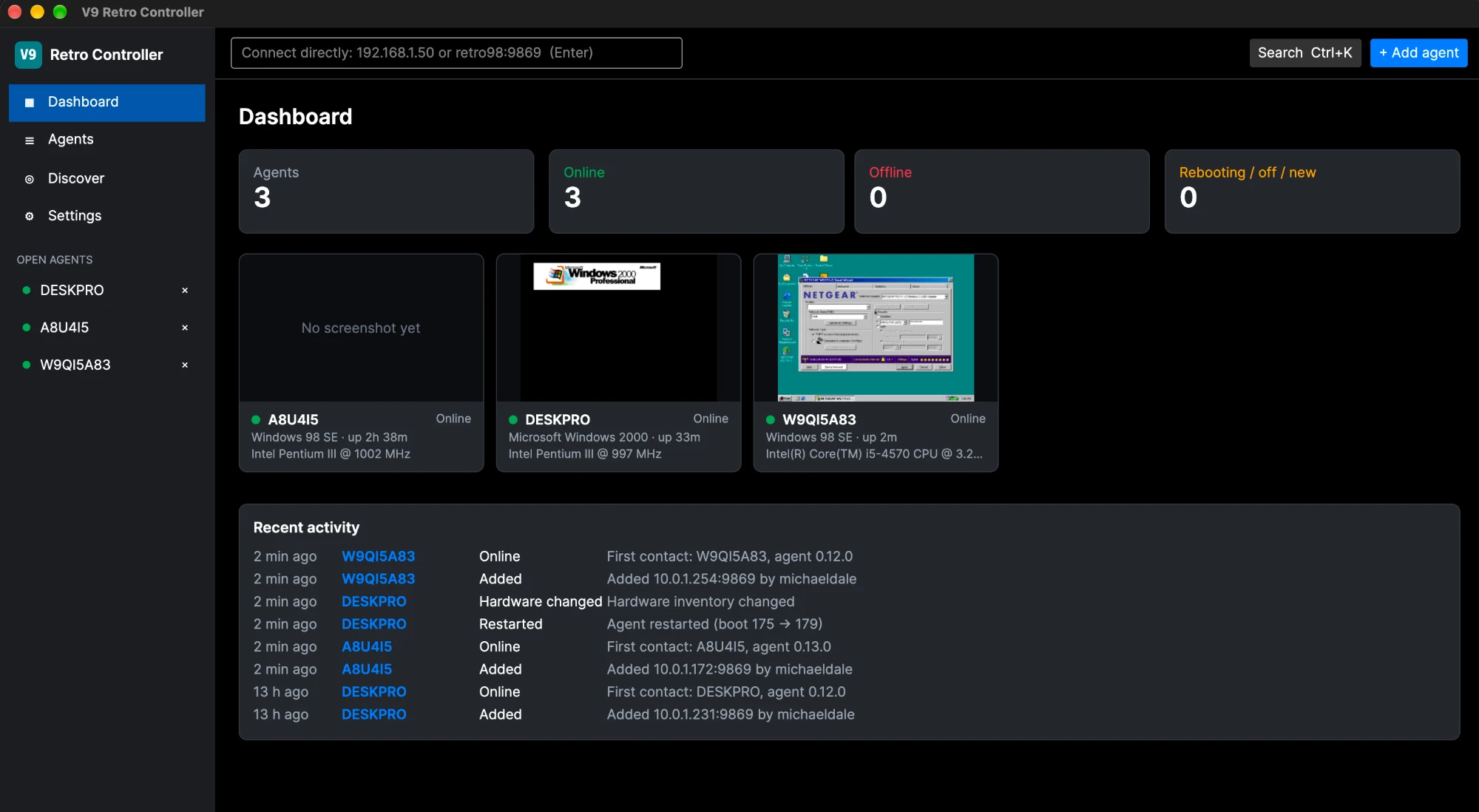
The V9 Retro Controller dashboard with three retro machines online

Prefer a GUI?

V9 Retro Controller

A desktop app for Windows and macOS that watches and drives a whole fleet of machines running this agent: dashboard, screenshots, console, files, registry, power, agent updates and a built-in VNC viewer, with mDNS discovery.

About V9 Retro Controller

Remote help

Lend a machine to a developer

From 0.12.0 an owner can lend a real machine to the developer over the Internet, with a chat window, a Pause switch in the tray, and every command signed with a key that exists only on the developer's PC. The MCP server drives a lent machine through the same tools by passing its machine id.

How to enable remote help Design notes

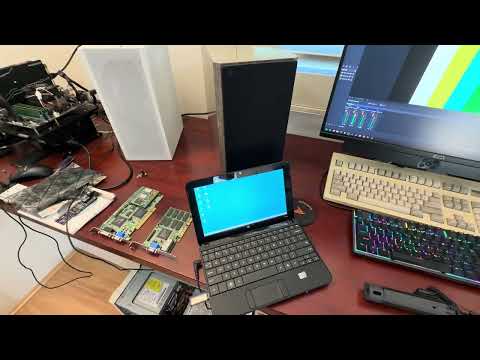
Velocity9x Windows 9x VGA Driver Test Bench

Velocity9x Windows 9x VGA Driver Test Bench

· 2:43

The test bench used for Velocity9x development: the machines and period PCI cards, and the V9x Remote Agent, the open-source remote-control tool that lets an AI coding agent drive a Windows 98 machine to automate and speed up testing.

Download

Release 0.17.0

v9x-remote-agent-0.17.0-win32.zip

Guest package: copy to the retro machine and run SETUP.EXE.

Download · 114 KB

v9xremote-0.17.0.zip

Host bundle: the PowerShell CLI, MCP server, documentation and guest package.

Download · 427 KB

V9XREMOTE.ISO

The same installer as a CD image, for a VM or a burned disc.

Download · 774 KB

Free software under the BSD 2-Clause licence. Documentation: AI workflows, guest agent, protocol, DOS build, changelog.